
FOLDRite Template Master
SAVE TIME BUILDING BROCHURES IN INDESIGN
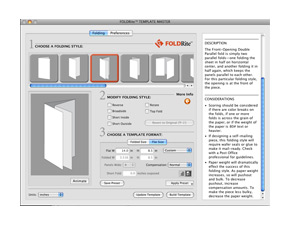 FOLDRite is an easy-to-use, but very powerful plug-in for Adobe InDesign that creates folded brochures designed with precision (technically, the plug-in opens up a separate program). A layout that could ordinarily take more than an hour to create manually can be created in a matter of minutes.
The process starts by selecting FOLDRite Template Master from the File menu (after installing the plug-in of, course), then you choose the type of folded document from eleven styles. If you have the Info panel open, the names of the different folds are shown along with considerations about printing the design. Next come the style modification settings that include: reversing the fold; using a broadside, short inside, or short outside fold; or rotating the layout. Finally, you choose either the overall flat size or the panel size. Some settings allow you to change the number of panels and how any inside panel widths are adjusted. You can also save the settings as a preset and use it to update an existing InDesign layout (without losing any of the layout’s objects).
The layout created is a production-manager’s dream: fold lines and crop marks inside the slug area (but outside the bleed); panels all clearly identified; and all marks and guides on separate, locked layers.
I was surprised at the price, however. At more than half the cost of InDesign, FOLDRite might be priced too high for the average freelance designer. Of course, if you’re building brochures on a daily (or even weekly) basis, the payback can come quickly.
To show how serious this company takes folding, in addition to the plug-in, Network PDF sells books and posters about folding. A limited demo version of the plug-in is available.—David Creamer
PRICE: $399
FROM: Network PDF, Inc.
WEB: www.networkpdf.com
RATING: 4.5
LAYERS VERDICT
HOT Makes designing jobs with folds very easy
NOT Price