
Joby Gorillapod Focus
LIGHTWEIGHT, FLEXIBLE SOLUTION TO A HEAVY PROBLEM
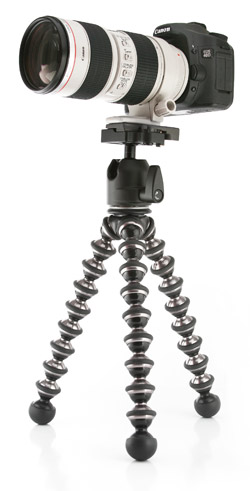 I love tripods. I love the rock-steady, razor-sharp images I can create using a tripod. What I don’t like about tripods is carrying them. They don’t fit in the overhead compartment, and if I use a tripod in Rome or on the Acropolis I have to pay a “professional” fee. So when I first encountered the Joby Gorillapod SLR-ZOOM a few years ago, I was intrigued. Looking like a combination back massager and child’s toy, the SLR-ZOOM could wrap its prehensile legs around almost anything stable, and I quickly discovered it kept my camera as steady as any of my behemoth tripods. When I was doing a night shot at the Roman Coliseum, I wrapped the strange Gorillapod legs around an old steel railing and got some great night shots. Most importantly, the local authorities didn’t think it looked like a tripod and so, no fee.
My one complaint was that my large camera and its huge lens were almost more weight than the SLR-ZOOM could handle. Along comes the Gorillapod Focus. Hooray! Whereas the SLR-ZOOM has a 6.5-lb limit, the new Focus (which only weighs 1.1 lbs) can handle a whopping 11 lbs. I immediately took it for a spin and was impressed. The Gorillapod uses a standard ¼” screw mount (or 3/8″ with an adapter), which takes time to attach or detach. So I added a quick mount adapter, and now it’s perfect. If you want to use a tripod on your trips, buy one of these jewels now! They come in five different sizes; so find the size that matches you camera and lens. The Gorillapod Focus sells for $109.95 and is worth every penny.—Dave Huss
Company: Joby, Inc.
Price: $109.95
Web: www.joby.com
Rating: 5
Hot: Lightweight; handles large cameras
Not: