
MAPublisher 8.1
CARTOGRAPHY SOFTWARE FOR ILLUSTRATOR
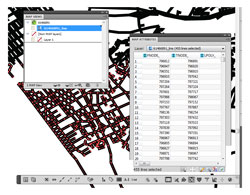 The MAPublisher plug-in for Illustrator CS3 and CS4 is not for the timid: You should be familiar with GIS (Geographic Information System) data and have a need to publish that data in a visual format. Simply put, the plug-in uses GIS data to create maps in Illustrator. You first create an Illustrator file and import the GIS data (in popular data formats such as AutoCAD, ESRI, MapInfo, and USGS) to create maps up to 200″ square. After importing, you can manipulate the resulting map in a number of ways.
Last time I used MAPublisher, it was version 4; it’s come a long way since then. Exciting new features include the ability to export maps to an interactive Flash file (this alone could expand the user base); automate the labeling of map features (as an optional add-on); use stylesheets for consistent formatting; work with GPS data; crop maps without messing up the overall map coordinates; and use CS4’s multiple artboards. Some of these features take time to set up and use properly; however, most of the setup work can be saved for future use.
The only fault I found was not with the MAPublisher plug-in, but with the tutorials. They certainly showed how to work with the plug-in’s features well enough (and perhaps that’s all you might expect) but I’d have liked more information on how the data could be used after manipulating it with the tools. I suspect Avenza didn’t want to insult their more-experienced audience by telling them how to do their jobs because, as mentioned above, you need to be familiar with GIS and its use. But a section on “why you might need and how you can use this data” might be useful for beginners in the GIS arena.—David Creamer
Company: Avenza Systems Inc.
Price: $1,249 (Upgrade $549)
Web: www.avenza.com
Rating: 5
Hot: Creates maps from GIS data
Not: Cost