
NVIDIA Quadro FX 4800 for Mac
VISUAL COMPUTING FROM THE DESKTOP
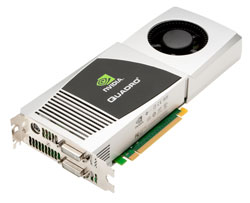 The new professional-level Quadro FX 4800 with 1.5 GB of memory brings a much-needed performance upgrade to the Mac Pro lineup. But why do you need a $1,799 graphics card? If you’re not a full-time design/graphics professional with a large budget, you probably don’t. But if you are, the timesaving and quality precision you’ll get with this card pays for itself in no time.
Where this card shines is the NVIDIA’s revolutionary new CUDA technology and Elemental Technologies Elemental Accelerator, which lets your system use all 192 GPU processor cores instead of just the typical eight cores in a Mac Pro CPU. Not only will your system benefit from the increased performance, using the GPU will speed up your workflow by freeing up your CPU to do other tasks. So, what does this mean for the Adobe Creative Suite professional?
Imagine being able to view After Effects’ nested compositions or rendering effects such as Bilateral Blur, Turbulent Noise, and Depth of Field Blur three to five times faster, or even seeing those effects in near real time as you make adjustments? Not to mention rendering the Cartoon Effect 38x faster with the GPU rather than CPU rendering. And it doesn’t stop there! You’re looking at massive speed increases in Photoshop CS4 vs. non-GPU accelerated computers, and the image’s interpolation quality far exceeds that of non-GPU-accelerated systems. In addition, the Elemental Accelerator allows Adobe Premiere to render H.264 movies using the GPU at faster-than-real-time speeds, which is pretty much unheard of with CPU rendering. Plus you’ll be able to render resized movies in half the time.
If you need a professional choice when it comes to workstation-level graphics on the Mac Pro, then look no further than the NVIDIA Quadro FX 4800.—Eric Kuna
Company: NVIDIA Corporation
Price: $1,799
Web: www.nvidia.com
Rating: 4.5
Hot: GPU acceleration; CUDA technology; Elemental Accelerator
Not: Limited GPU support outside Adobe Apps; cost