
Partigen
Flash finally does particles
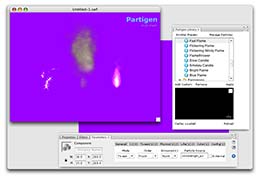 As a motion-graphics artist used to After Effects, it’s always irked me that Flash doesn’t include a particle system. I’ve had to create particles in After Effects and export them to Flash as videos, which bloat my SWF files and makes it hard for me to integrate particle effects with other Flash elements. So I danced a happy jig when I found Partigen.
This fantastic plug-in lets you create 2D particle systems via drag-and-drop or ActionScript. Animators will be able to create particles without writing code. Coders will be able to add all sorts of cool, interactive effects. Particles that follow the mouse or change color when you roll over them? No problem!
Partigen ships with a library of preset effects: fire, explosions, rain, snow, and water. And you can add your own custom effects. You can even export your effects and share them with other animators.
Particles themselves can be any imported graphic: arrows, blobs, dots, company logos, and so on. And you can tween emitters so that particles appear from different parts of the stage at different times. Without writing code, you can control many aspects of the system from the Properties panel. Best of all, there’s no render time. Tweak a property and you can instantly see how the system changes. Grudgingly, I’ll admit this blows After Effects out of the water.
My one gripe: Partigen only works with ActionSript 2.0. Pure animators won’t care, but as a programmer who is migrating to 3.0, this is disappointing. I emailed the developer and asked him if a 3.0 version is on the horizon and he assured me that it is. I await an upgrade!—Marcus Geduld
PRICE: $99
FROM: Desuade
PHONE:
WEB: www.desuade.com
FOR: Mac and Windows
RATING: 4
LAYERS VERDICT
HOT Complete particle system for Flash
NOT Not compatible with ActionScript 3.0